Thursday, September 22, 2011

Debug Mass Activity Transactions (DBUG)

SAP has a reserve command DBUG for you to debug mass activity transactions such as FPVA (Dunning Proposal).

Once you enter DBUG at command field and hit return key.


You will see this Pop Up Message.
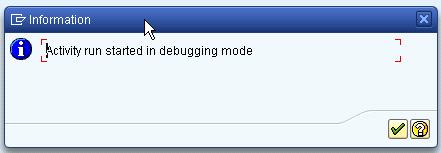

When you start running the program, the debugger will be launched.

Sunday, August 21, 2011

Tips on ISU_FINDER - Part 2

ISU_FINDER's EFINDPAR structure contains a lot of date field, so what do they mean? Basically, ISU_FINDER use these date field to search for object in their respective areas, some important date field as per below:
  • EVER-EINZDAT             <= V_DATE_TO  
  • EVER-AUSZDAT             >= V_DATE  
  • V_EANL-AB                <= I_DATE
  • V_EANL-BIS               >= I_DATE 
  • EASTL-AB                 <= D_DATE 
  • EASTL-BIS                >= D_DATE 
  • V_EGER_H-AB              <= D_DATE 
  • V_EGER_H-BIS             >= D_DATE 
  • EGERR-AB                 <= D_DATE 
  • EGERR-BIS                >= D_DATE 
  • EABP-BEGPERIODE          <= U_DATE 
  • EABP-ENDPERIODE          >= U_DATE

Friday, July 22, 2011

Debugger Variant

Debugger Variant allow you to save your current debugger layout, breakpoints, settings, and options into database or file. These components can be loaded again at later days. This comes very handy especially when your project team involves offshore support, or you need to pass the problem that you were working on to your co-workers. By default, there is a debugger variant named START_UP which is always loaded when you start the New ABAP Debugger. You can overwrite this debugger variant if you want to load the current setting every time you launch the debugger. Otherwise, you can save it with other name and then load it via Debugger -> Debugger Session -> Load when you need it.

For Example, I want to find out why and when SAP that flag EABLG-UNTERDR to 'X'. Thus, I use where-used list to find out all the program.

As you can see there is a lot of programs changing the value of this field. It would be troublesome if I want to debug same pieces of code again in the future. Thus, after setting the session breakpoint, I launch debugger.


And I go to save debugger variant.

Next time, when I launch debugger again. I will just need to go to Debugger Session and then load the debugger variant and all the break points are waiting for me now.

Tuesday, June 21, 2011

FREE_SELECTIONS_WHERE_2_EX

This FM works the other way round from FM 'FREE_SELECTIONS_EX_2_WHERE'. It converts select statement's where condition into expression that you can use in FREE_SELECTIONS_EX_2_WHERE. I re-use the example in my previous post here.
Conditions:
WHERE hvorg EQ '0600'
AND ( tvorg EQ '0010'
OR tvorg EQ '0011' )
AND augst EQ ''
AND augrd NE '05'. 
 
Input:

Result:

Saturday, May 28, 2011

Request Protection Function in SE10

You can protect your request to avoid other people to add more users. You can go to Request/task -> Request -> Protect to do so, alternatively you can right click on your request and then choose protect or use function key Ctrl + F2

To remove the protection, choose Remove Protection.

Thursday, May 19, 2011

How to assign Shop Paper?


1. Go to SPRO -> SAP Customizing Implementation Guide -> Plant Maintenance and Customer Service -> Maintenance and Service Processing -> Basic Settings -> Print Control -> Define Shop Papers, Forms and Output Programs.


2. Choose Assign Permitted Shop Papers


3. Choose Work Area "N" (Notification (PM/QM..))


4. You will find the Document Type = Notification Type, Shop Paper Name, Selection Text for Shop Paper and Selected Indicator.

Maintenance View: V_T390_O [Shop Papers Allowed by Order Type or NotifType]
Tables: T390_O [PM: Shop paper control by order type],
T390 [PM: Shop papers for print control],
T390_OT [Description of shop papers per document type selection],

Monday, May 16, 2011

Document Type

The document type classifies the accounting documents. It is stored in the document header.

Attributes that control the entry of the document, or which are they noted in the document, are defined for each document type. In particular, the number range assigned to the associated documents is defined on the basis of the document type.
Extraction from SAP.

Normally, field name for document type is BLART.