| TABFROM | TABTO | LINKID | Remarks |
| BCONT | EKUN | ||
| EABL | EABLG | ||
| EABL | ETDZ | ||
| EABLG | EABL | ||
| EABP | EABP | ||
| EABP | EVER | ||
| EADZ | EASTS | ||
| EADZ | ETDZ | ||
| EANL | EASTL | ||
| EANL | EASTS | ||
| EANL | ETTIF | ||
| EANL | EVBS | ||
| EANL | EVER | ||
| EANL | TE422 | ||
| EASTI | EASTI | ||
| EASTI | EASTIH | ||
| EASTI | ETDZ | ||
| EASTIH | EASTI | ||
| EASTL | EANL | ||
| EASTL | EGER | ||
| EASTS | EADZ | ||
| EASTS | EANL | ||
| EASTS | ETDZ | ||
| EAUS | EAUSV | ||
| EAUS | FKKVKP | ||
| EAUSV | EAUS | ||
| EAUSV | EVER | ||
| EEIN | EEINV | ||
| EEIN | FKKVKP | ||
| EEINV | EEIN | ||
| EEINV | EVER | ||
| EGER | EASTL | ||
| EGER | EGPL | ||
| EGER | ETDZ | ||
| EGER | EZUG | 1 | EGER-LOGIKNR = EZUG-LOGIKNR |
| EGER | EZUG | 2 | EGER-LOGIKNR = EZUG-LOGIKNR2 |
| EGER | EZUZ | ||
| EGPL | EGER | ||
| EGPL | EHAU | ||
| EGPL | EVBS | ||
| EHAU | EGPL | ||
| EHAU | EVBS | ||
| EKUN | BCONT | ||
| EKUN | FKKVKP | ||
| ETDZ | EABL | 0 | All Meter Readings with status "0" |
| ETDZ | EABL | 1 | All Meter Readings with status <> "0" |
| ETDZ | EADZ | ||
| ETDZ | EASTI | ||
| ETDZ | EASTS | ||
| ETDZ | EGER | ||
| ETDZ | EZUZ | ||
| ETINS | EVBS | ||
| ETTIF | EANL | ||
| EVBS | EANL | ||
| EVBS | EGPL | ||
| EVBS | EHAU | ||
| EVBS | ETINS | ||
| EVER | EABP | ||
| EVER | EANL | ||
| EVER | EAUSV | ||
| EVER | EEINV | ||
| EVER | FKKVKP | ||
| EZUG | EGER | 1 | EZUG-LOGIKNR = EGER-LOGIKNR |
| EZUG | EGER | 2 | EZUG-LOGIKNR2 = EGER-LOGIKNR |
| EZUZ | EGER | ||
| EZUZ | ETDZ | ||
| FKKVKP | EAUS | ||
| FKKVKP | EEIN | ||
| FKKVKP | EKUN | ||
| FKKVKP | EVER | ||
| TE420 | TE422 | ||
| TE422 | EANL | ||
| TE422 | TE420 |
Showing posts with label ISU. Show all posts
Showing posts with label ISU. Show all posts
Sunday, February 23, 2020
ISU_STRUCTURE_READ (Part 2)
TABLES XT_PATH drives the sequence of FM "ISU_STRUCTURE_READ" retrieve data. The following table lists pre-defined sequence of tables supported by SAP to retrieve data from. Whenever this function module is called, the corresponding internal table listed in TABFROM field of the first record must contain the keys for data retrieval.


Thursday, October 18, 2012

Tuesday, September 18, 2012

Friday, August 24, 2012
Event R721 Restrict Contracts during creation of disconnection / reconnection order
In one of our implementation, we create disconnect order in background by calling FM 'ISU_S_DISCDOC_CHANGE', and we have troubles in deciding which devices to be disconnected and some devices are not even exist in the itab XY_DVALOBJ (BAPI Definition ISU_SERVORD_EDCN, Method SET_ORDERCODE_DISCONNECT) for you to choose.
SAP use a unique way to find out Contracts that can be disconnected. Basically SAP will check contracts that are listed in the open overdue items against dunning activities (FKKMAKT), and then check against Dunning History (FKKMAZE), if records exist, the contract can be disconnected. Thus, sometimes when you reverse the dunning and then re-run it again, some other devices are available for you to choose again, it's kind of magic. Lol~
Anyway, this can be resolved by enhancing event R721, you can either refresh itab T_DISC_EVER, so that all contracts are taken into consideration, or, define your own logic to include more contracts to T_DISC_EVER.
Technical Information:
Program: SAPLES34
Include Program: LES34F46
Form: DCORD_DARK_PBO
Then,
FM 'ISU_DISCDOC_ENVIRONMENT_SELECT'
Then,
FM 'ISU_GET_EVER_DISC_RELEVANT'
Then,
FM 'ISU_DB_GET_POS_DISC_RELEVANT'
SAP use a unique way to find out Contracts that can be disconnected. Basically SAP will check contracts that are listed in the open overdue items against dunning activities (FKKMAKT), and then check against Dunning History (FKKMAZE), if records exist, the contract can be disconnected. Thus, sometimes when you reverse the dunning and then re-run it again, some other devices are available for you to choose again, it's kind of magic. Lol~
Anyway, this can be resolved by enhancing event R721, you can either refresh itab T_DISC_EVER, so that all contracts are taken into consideration, or, define your own logic to include more contracts to T_DISC_EVER.
Technical Information:
Program: SAPLES34
Include Program: LES34F46
Form: DCORD_DARK_PBO
Then,
FM 'ISU_DISCDOC_ENVIRONMENT_SELECT'
Then,
FM 'ISU_GET_EVER_DISC_RELEVANT'
Then,
FM 'ISU_DB_GET_POS_DISC_RELEVANT'
Friday, August 17, 2012
Loans (Part 5) EK25, EK26, and EK27
EK25

EK26, EK27


Functionalities:

Functionalities:
- Enter BP Number or Contract Account Number, posting parameters, loan installment parameters and loan parameters to create loan
- Loan Recipient and Out Payment Account
- Contract Account / Business Partner to which the outgoing loan payment is posted. Loans granted can be paid out to:
- The customer who will pay back the loan. This is also the customer for whom the repayment plan is created.
- A third party. This is usually the case if the loan is granted for the purchase of a subsidized device, such as a heat pump, or a subsidized service, such as insulation measures. In this case, the loan should be paid directly to the supplier or service provider concerned.
EK26, EK27


Functionalities:
- In change mode, you can perform the following activities:
- Deactivate Loan Repayment Plan
- Make changes to:
- Automatic Payment Lock Reason (P)
- Dunning Lock Reason (D)
- Interest Lock Reason (I)
- Clearing Lock Reason (C)
- Alternative Business Partner for Payments
- Payment Method
- Bank Details ID of Payee
- Alternative Payment Card ID in Document
- Exclude from dunning run
- Notes for document
- Save the changes and create letter
- System Menu Environment provides few options:
- Source Receivables (Account Display) brings you to Account Balance Screen (FPL9)
- Interest Supplement or Interest Documents bring you to a list with loan interest information, click on any of them will launch t-code FPE3
- Installment Plans Business Partner or Contract Account will call FM 'FKK_S_INSTPLAN_GETLIST' to show all loans belong to this business partner or Contract Account
Saturday, August 4, 2012
Debug FQ Events
In SAP IS-U, most of the FICA and Billing related enhancements are using FQ-Events. To debug/ find out what FQ Events to use for certain transaction, use the following steps:
1. In command field, enter /h

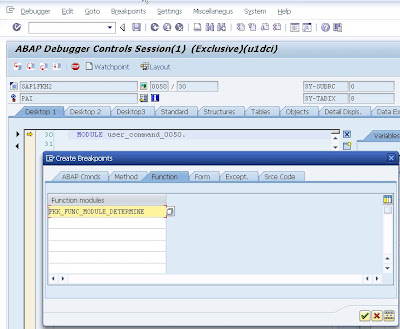
2. When Debugger Controls Session is launched, set break point for FM 'FKK_FUNC_MODULE_DETERMINE '.
3. Continue and Debugger will stop at FM 'FKK_FUNC_MODULE_DETERMINE '.
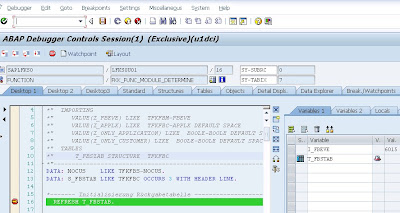
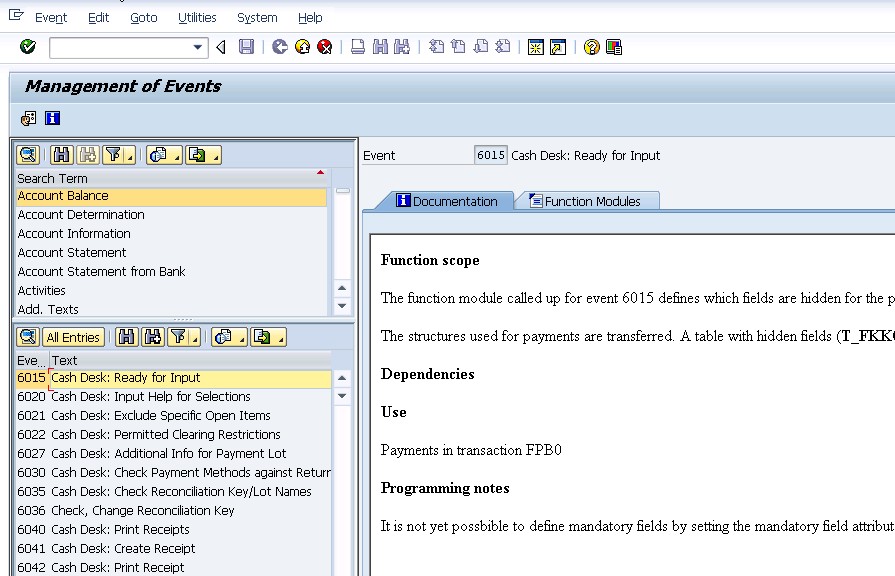
4. I_FBEVE is the FQ Event Number, and at the end of this FM, T_FBSTAB will contains all the FMs that will be called under this event. You can get more information of this event via command FQEVENTS.

1. In command field, enter /h

2. When Debugger Controls Session is launched, set break point for FM 'FKK_FUNC_MODULE_DETERMINE '.

3. Continue and Debugger will stop at FM 'FKK_FUNC_MODULE_DETERMINE '.

4. I_FBEVE is the FQ Event Number, and at the end of this FM, T_FBSTAB will contains all the FMs that will be called under this event. You can get more information of this event via command FQEVENTS.
Monday, April 16, 2012
Loans (Part 4) Event 2900
Event: 2900 Loan: Calculate Repayment Plan
Sample FM: FKK_SAMPLE_2900_NEW
The function module processed at event 2900 calculates a repayment plan for a loan on the basis of the transfer parameters.
The module creates the repayment plan in table TFKKLOAN and returns it to the calling program.
Field FAEDN of table FKKLOAN contains the due dates of the individual loan installments. This module calculates the fields INTEREST (interest amount), REPAYMENT (repayment amount), ANNUITY (Annuity = interest amount + repayment amount) for the individual due dates.
Make sure that the condition INTEREST + REPAYMENT = ANNUITY is filled for all due dates.
In addition, the total of the amounts in the field REPAYMENT must agree with the total loan (import parameter I_LOANAMOUNT).
Notes:
Sample FM: FKK_SAMPLE_2900_NEW
The function module processed at event 2900 calculates a repayment plan for a loan on the basis of the transfer parameters.
The module creates the repayment plan in table TFKKLOAN and returns it to the calling program.
Field FAEDN of table FKKLOAN contains the due dates of the individual loan installments. This module calculates the fields INTEREST (interest amount), REPAYMENT (repayment amount), ANNUITY (Annuity = interest amount + repayment amount) for the individual due dates.
Make sure that the condition INTEREST + REPAYMENT = ANNUITY is filled for all due dates.
In addition, the total of the amounts in the field REPAYMENT must agree with the total loan (import parameter I_LOANAMOUNT).
Notes:
- Monthly Duration = 30 days
- IF interval type = monthly and the interval = 1. The formula is
- Loan Monthly Payment Amount = [ rate + ( rate / { [ (1 + rate ) ^ months ] - 1 } ) ] * principal
- rate = annual percentage rate / 1200
- ELSE
- Get estimate roughly by triangle hypothesis - total interest amount
- Total Interest Amount = [ ( principal /2 ) * rate * ( duration / 360 ) ]
- Payment Amount per Interval = [ Total Interest Amount + Principal Amount ] / Number of Installments
Sunday, March 25, 2012
FPL9's Line Item Description (Part 3)
Sometimes if the description of the list in FPL9 is missing. May be it is due to the configuration via the following path.
The "Description in Co. Code" field is the one that displayed on FPL9 screen.


The "Description in Co. Code" field is the one that displayed on FPL9 screen.


Subscribe to:
Posts (Atom)