Showing posts with label Debugging. Show all posts

Saturday, August 4, 2012

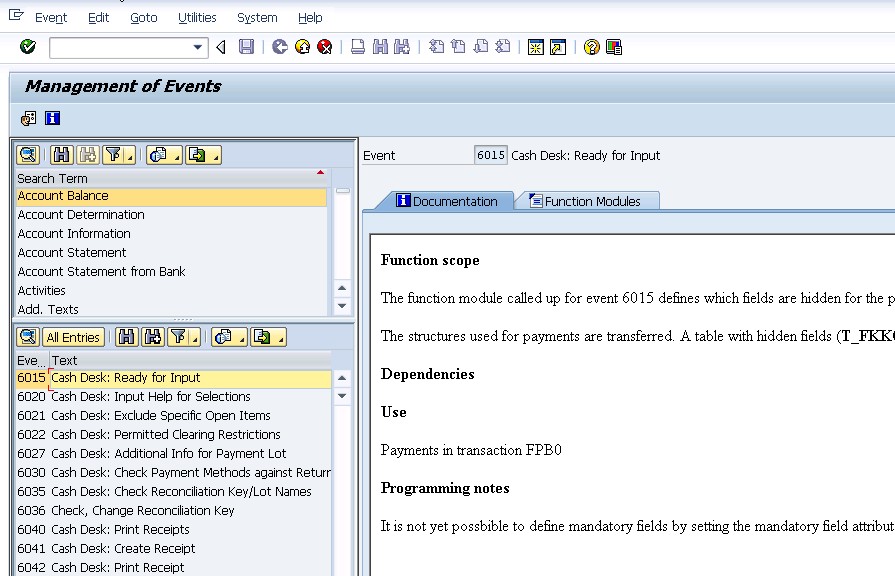
Debug FQ Events

In SAP IS-U, most of the FICA and Billing related enhancements are using FQ-Events. To debug/ find out what FQ Events to use for certain transaction, use the following steps:
1. In command field, enter /h

2. When Debugger Controls Session is launched, set break point for  FM 'FKK_FUNC_MODULE_DETERMINE '.

3. Continue and Debugger will stop at FM 'FKK_FUNC_MODULE_DETERMINE '.

4. I_FBEVE is the FQ Event Number, and at the end of this FM, T_FBSTAB will contains all the FMs that will be called under this event. You can get more information of this event via command FQEVENTS.

Thursday, September 22, 2011

Debug Mass Activity Transactions (DBUG)

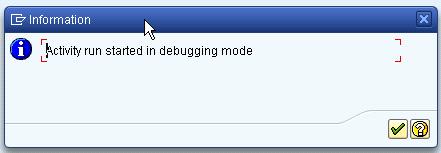
SAP has a reserve command DBUG for you to debug mass activity transactions such as FPVA (Dunning Proposal).

Once you enter DBUG at command field and hit return key.


You will see this Pop Up Message.


When you start running the program, the debugger will be launched.

Friday, July 22, 2011

Debugger Variant

Debugger Variant allow you to save your current debugger layout, breakpoints, settings, and options into database or file. These components can be loaded again at later days. This comes very handy especially when your project team involves offshore support, or you need to pass the problem that you were working on to your co-workers. By default, there is a debugger variant named START_UP which is always loaded when you start the New ABAP Debugger. You can overwrite this debugger variant if you want to load the current setting every time you launch the debugger. Otherwise, you can save it with other name and then load it via Debugger -> Debugger Session -> Load when you need it.

For Example, I want to find out why and when SAP that flag EABLG-UNTERDR to 'X'. Thus, I use where-used list to find out all the program.

As you can see there is a lot of programs changing the value of this field. It would be troublesome if I want to debug same pieces of code again in the future. Thus, after setting the session breakpoint, I launch debugger.


And I go to save debugger variant.

Next time, when I launch debugger again. I will just need to go to Debugger Session and then load the debugger variant and all the break points are waiting for me now.

Monday, July 19, 2010

System Debugging

System Debuggin is used to debug a system program. Debugger will skip this program if System Debugging is not turned on even though you had set the session breakpoint.
How to check the program is system program or not? Go to -> Attribute, Look for Program Status field, "S" represent System Program.


How to turn on System Debugging?
  1. Enter "/hs" instead of "/h" in Command Field.
  2. Go to System -> Utilities -> Debug System.
  3. In debugging session, before reaching the system program, go to Setting -> Display/Change Debugger Settings, and change the debugger setting
  4. In debugging session, before reaching the system program, go to Setting -> System Debugging On/Off.

Monday, June 21, 2010

How to debug Background Job (Part 3)

1. During implement your code, Call FM 'C160_HOLD_FOR_DEBUG'.
2. Go to System -> User Profile -> Own Data or T-Code SU03.

3. Add a User Master Parameter ID, 'ESN' and flag it with 'X'. Data stored in Table USR05.

4. This FM will run a infinite loop now and you can debug via SM50.

Thursday, June 17, 2010

How to debug Background Job (Part 2)

1. Write an infinite loop in your code.
DATA: lv_infinite TYPE i.

WHILE lv_infinite EQ 0.
ENDWHILE.
2. Then go to SM50, select the program and then go to:
Program/Session -> Program ->Debugging

Tuesday, June 15, 2010

How to debug Background Job (Part 1)


1. Go to SM37, choose the background job that you want to debug.
2. Enter 'JDBG' (Without '/') at Command Field.