FUNCTION ISU_VAL_ZTHOLD1 .
*"----------------------------------------------------------------------
*"*"Local Interface:
*" IMPORTING
*" REFERENCE(X_TE327) LIKE TE327 STRUCTURE TE327
*" CHANGING
*" REFERENCE(XY_OBJ) TYPE ISU2A_BILLING_DATA
*" REFERENCE(XY_OUTCNSO) LIKE ERCHO-OUTCNSO
*" EXCEPTIONS
*" GENERAL_FAULT
*"----------------------------------------------------------------------
* Compare ( Current Bill Amount + Uninvoiced Amount + Account Balance )
* against Highest and Minimum Amounts
*"----------------------------------------------------------------------
DATA: ls_erchz LIKE erchz,
lv_nettobtr LIKE erchz-nettobtr,
lv_uninvoiced LIKE erchz-nettobtr,
lv_acc_bal LIKE erchz-nettobtr,
lv_outsorted TYPE c,
lv_deviation LIKE ercho-deviation.
LOOP AT xy_obj-bill-ierchz INTO ls_erchz
WHERE buchrel = 'X'.
IF ls_erchz-abslkz IS INITIAL.
lv_nettobtr = lv_nettobtr + ls_erchz-nettobtr.
ENDIF.
ENDLOOP.
PERFORM get_uninvoiced_amount USING xy_obj-st-wfkkvkp
CHANGING lv_uninvoiced.
PERFORM get_account_balance USING xy_obj-st-wfkkvkp
CHANGING lv_acc_bal.
lv_nettobtr = lv_nettobtr + lv_acc_bal + lv_uninvoiced.
CALL FUNCTION 'ISU_E25M_BETRW_WAERS_CORRECT'
EXPORTING
x_amount = lv_nettobtr
x_currency = ls_erchz-twaers
IMPORTING
y_amount = lv_nettobtr
EXCEPTIONS
too_many_decimals = 1
OTHERS = 2.
IF sy-subrc NE 0.
mac_msg_putx co_msg_error '274' 'AJ' x_te327-validation space
space space general_fault.
IF 1 = 2. MESSAGE e274(aj) WITH space. ENDIF.
ENDIF.
break ogoh.
IF lv_nettobtr > x_te327-value1.
lv_deviation = lv_nettobtr.
lv_outsorted = 'X'.
mac_msg_putx co_msg_warning '003' 'ZMSG_BI' x_te327-validation xy_obj-bill-erch-belnr
lv_nettobtr x_te327-value1 space.
IF 1 = 2.
MESSAGE e003(zmsg_bi) WITH '&' '&' '&' '&'.
* &1: Bill Doc &2's account balance &3 exceeds threshold $&4
ENDIF.
ENDIF.
IF NOT lv_outsorted IS INITIAL.
CALL FUNCTION 'ISU_OUTSORT_IERCHO_WRITE'
EXPORTING
x_validation = x_te327-validation
x_deviation = lv_deviation
CHANGING
xy_iercho = xy_obj-bill-iercho
xy_outcnso = xy_outcnso.
ENDIF.
ENDFUNCTION.
Thursday, April 3, 2025
Billing: Create Custom Outsort Check (Example 2)
Example 2:


Sunday, March 2, 2025
Billing: Create Custom Outsort Check (Example 1)
Example 1:
FUNCTION isu_val_zaccbal1 .
*"----------------------------------------------------------------------
*"*"Local Interface:
*" IMPORTING
*" REFERENCE(X_TE327) LIKE TE327 STRUCTURE TE327
*" CHANGING
*" REFERENCE(XY_OBJ) TYPE ISU2A_BILLING_DATA
*" REFERENCE(XY_OUTCNSO) LIKE ERCHO-OUTCNSO
*" EXCEPTIONS
*" GENERAL_FAULT
*"----------------------------------------------------------------------
DATA: ls_erchz LIKE erchz,
lv_nettobtr LIKE erchz-nettobtr,
lv_uninvoiced LIKE erchz-nettobtr,
lv_acc_bal LIKE erchz-nettobtr,
lv_outsorted TYPE c,
lv_deviation LIKE ercho-deviation.
LOOP AT xy_obj-bill-ierchz INTO ls_erchz
WHERE buchrel = 'X'.
IF ls_erchz-abslkz IS INITIAL.
lv_nettobtr = lv_nettobtr + ls_erchz-nettobtr.
ENDIF.
ENDLOOP.
PERFORM get_uninvoiced_amount USING xy_obj-st-wfkkvkp
CHANGING lv_uninvoiced.
PERFORM get_account_balance USING xy_obj-st-wfkkvkp
CHANGING lv_acc_bal.
lv_nettobtr = lv_nettobtr + lv_acc_bal + lv_uninvoiced.
CALL FUNCTION 'ISU_E25M_BETRW_WAERS_CORRECT'
EXPORTING
x_amount = lv_nettobtr
x_currency = ls_erchz-twaers
IMPORTING
y_amount = lv_nettobtr
EXCEPTIONS
too_many_decimals = 1
OTHERS = 2.
IF sy-subrc NE 0.
mac_msg_putx co_msg_error '274' 'AJ' x_te327-validation space
space space general_fault.
IF 1 = 2. MESSAGE e274(aj) WITH space. ENDIF.
ENDIF.
break ogoh.
IF lv_nettobtr < x_te327-value1 OR
lv_nettobtr > x_te327-value2.
lv_deviation = lv_nettobtr.
lv_outsorted = 'X'.
mac_msg_putx co_msg_warning '002' 'ZMSG_BI' x_te327-validation xy_obj-bill-erch-belnr
xy_obj-st-wfkkvkp-vkont lv_outsorted space.
IF 1 = 2.
MESSAGE e002(zmsg_bi) WITH '&' '&' '&' '&'.
* &1: Bill Doc &2 Contract Account &3 is outsorted due to acc bal &4
ENDIF.
ENDIF.
IF NOT lv_outsorted IS INITIAL.
CALL FUNCTION 'ISU_OUTSORT_IERCHO_WRITE'
EXPORTING
x_validation = x_te327-validation
x_deviation = lv_deviation
CHANGING
xy_iercho = xy_obj-bill-iercho
xy_outcnso = xy_outcnso.
ENDIF.
ENDFUNCTION.
*&---------------------------------------------------------------------*
*& Form GET_UNINVOICED_AMOUNT
*&---------------------------------------------------------------------*
* text
*----------------------------------------------------------------------*
* -->IS_FKKVKP Contract Account
* <--cv_uninv_amt mount="" nbsp="" ninvoiced="" span="">
*----------------------------------------------------------------------*
FORM get_uninvoiced_amount USING is_fkkvkp TYPE fkkvkp
CHANGING cv_uninv TYPE nettobtr.
DATA:
ls_eitr TYPE eitr,
lt_eitr TYPE STANDARD TABLE OF eitr,
ls_erch TYPE erch,
lt_erch TYPE STANDARD TABLE OF erch,
ls_dberchz TYPE dberchz,
lt_dberchz TYPE STANDARD TABLE OF dberchz.
SELECT * INTO TABLE lt_eitr FROM eitr
WHERE vkont EQ is_fkkvkp-vkont
AND simulation EQ space
AND tobreleasd EQ space.
IF sy-subrc IS INITIAL.
IF lt_eitr IS NOT INITIAL.
SELECT * INTO TABLE lt_erch FROM erch
FOR ALL ENTRIES IN lt_eitr
WHERE belnr EQ lt_eitr-belnr.
IF lt_erch IS NOT INITIAL.
SELECT * INTO CORRESPONDING FIELDS OF TABLE lt_dberchz
FROM dberchz1 AS i JOIN dberchz3 AS e
ON i~belnr EQ e~belnr
AND i~belzeile EQ e~belzeile
FOR ALL ENTRIES IN lt_erch
WHERE i~belnr EQ lt_erch-belnr
AND i~buchrel EQ 'X'.
ENDIF.
ENDIF.
ENDIF.
LOOP AT lt_dberchz INTO ls_dberchz.
cv_uninv = cv_uninv + ls_dberchz-nettobtr.
ENDLOOP.
ENDFORM.
*&---------------------------------------------------------------------*
*& Form GET_ACCOUNT_BALANCE
*&---------------------------------------------------------------------*
* text
*----------------------------------------------------------------------*
* -->IS_FKKVKP Contract Account
* <--cv_acc_bal alance="" ccount="" nbsp="" span="">
*----------------------------------------------------------------------*
FORM get_account_balance USING is_fkkvkp TYPE fkkvkp
CHANGING cv_acc_bal TYPE nettobtr.
DATA:
ls_bal TYPE bapiaccbalances,
lt_bal TYPE STANDARD TABLE OF bapiaccbalances.
CALL FUNCTION 'BAPI_ACCOUNT_GETBALANCES'
EXPORTING
contractaccount = is_fkkvkp-vkont
partner = is_fkkvkp-gpart
TABLES
account_balances = lt_bal.
LOOP AT lt_bal INTO ls_bal.
CASE ls_bal-text.
WHEN 'Open'.
cv_acc_bal = cv_acc_bal + ls_bal-withd_val.
WHEN 'Credit'.
cv_acc_bal = cv_acc_bal - ls_bal-withd_val.
ENDCASE.
ENDLOOP.
ENDFORM.
FUNCTION isu_val_zaccbal1 .
*"----------------------------------------------------------------------
*"*"Local Interface:
*" IMPORTING
*" REFERENCE(X_TE327) LIKE TE327 STRUCTURE TE327
*" CHANGING
*" REFERENCE(XY_OBJ) TYPE ISU2A_BILLING_DATA
*" REFERENCE(XY_OUTCNSO) LIKE ERCHO-OUTCNSO
*" EXCEPTIONS
*" GENERAL_FAULT
*"----------------------------------------------------------------------
DATA: ls_erchz LIKE erchz,
lv_nettobtr LIKE erchz-nettobtr,
lv_uninvoiced LIKE erchz-nettobtr,
lv_acc_bal LIKE erchz-nettobtr,
lv_outsorted TYPE c,
lv_deviation LIKE ercho-deviation.
LOOP AT xy_obj-bill-ierchz INTO ls_erchz
WHERE buchrel = 'X'.
IF ls_erchz-abslkz IS INITIAL.
lv_nettobtr = lv_nettobtr + ls_erchz-nettobtr.
ENDIF.
ENDLOOP.
PERFORM get_uninvoiced_amount USING xy_obj-st-wfkkvkp
CHANGING lv_uninvoiced.
PERFORM get_account_balance USING xy_obj-st-wfkkvkp
CHANGING lv_acc_bal.
lv_nettobtr = lv_nettobtr + lv_acc_bal + lv_uninvoiced.
CALL FUNCTION 'ISU_E25M_BETRW_WAERS_CORRECT'
EXPORTING
x_amount = lv_nettobtr
x_currency = ls_erchz-twaers
IMPORTING
y_amount = lv_nettobtr
EXCEPTIONS
too_many_decimals = 1
OTHERS = 2.
IF sy-subrc NE 0.
mac_msg_putx co_msg_error '274' 'AJ' x_te327-validation space
space space general_fault.
IF 1 = 2. MESSAGE e274(aj) WITH space. ENDIF.
ENDIF.
break ogoh.
IF lv_nettobtr < x_te327-value1 OR
lv_nettobtr > x_te327-value2.
lv_deviation = lv_nettobtr.
lv_outsorted = 'X'.
mac_msg_putx co_msg_warning '002' 'ZMSG_BI' x_te327-validation xy_obj-bill-erch-belnr
xy_obj-st-wfkkvkp-vkont lv_outsorted space.
IF 1 = 2.
MESSAGE e002(zmsg_bi) WITH '&' '&' '&' '&'.
* &1: Bill Doc &2 Contract Account &3 is outsorted due to acc bal &4
ENDIF.
ENDIF.
IF NOT lv_outsorted IS INITIAL.
CALL FUNCTION 'ISU_OUTSORT_IERCHO_WRITE'
EXPORTING
x_validation = x_te327-validation
x_deviation = lv_deviation
CHANGING
xy_iercho = xy_obj-bill-iercho
xy_outcnso = xy_outcnso.
ENDIF.
ENDFUNCTION.
*&---------------------------------------------------------------------*
*& Form GET_UNINVOICED_AMOUNT
*&---------------------------------------------------------------------*
* text
*----------------------------------------------------------------------*
* -->IS_FKKVKP Contract Account
* <--cv_uninv_amt mount="" nbsp="" ninvoiced="" span="">
*----------------------------------------------------------------------*
FORM get_uninvoiced_amount USING is_fkkvkp TYPE fkkvkp
CHANGING cv_uninv TYPE nettobtr.
DATA:
ls_eitr TYPE eitr,
lt_eitr TYPE STANDARD TABLE OF eitr,
ls_erch TYPE erch,
lt_erch TYPE STANDARD TABLE OF erch,
ls_dberchz TYPE dberchz,
lt_dberchz TYPE STANDARD TABLE OF dberchz.
SELECT * INTO TABLE lt_eitr FROM eitr
WHERE vkont EQ is_fkkvkp-vkont
AND simulation EQ space
AND tobreleasd EQ space.
IF sy-subrc IS INITIAL.
IF lt_eitr IS NOT INITIAL.
SELECT * INTO TABLE lt_erch FROM erch
FOR ALL ENTRIES IN lt_eitr
WHERE belnr EQ lt_eitr-belnr.
IF lt_erch IS NOT INITIAL.
SELECT * INTO CORRESPONDING FIELDS OF TABLE lt_dberchz
FROM dberchz1 AS i JOIN dberchz3 AS e
ON i~belnr EQ e~belnr
AND i~belzeile EQ e~belzeile
FOR ALL ENTRIES IN lt_erch
WHERE i~belnr EQ lt_erch-belnr
AND i~buchrel EQ 'X'.
ENDIF.
ENDIF.
ENDIF.
LOOP AT lt_dberchz INTO ls_dberchz.
cv_uninv = cv_uninv + ls_dberchz-nettobtr.
ENDLOOP.
ENDFORM.
*&---------------------------------------------------------------------*
*& Form GET_ACCOUNT_BALANCE
*&---------------------------------------------------------------------*
* text
*----------------------------------------------------------------------*
* -->IS_FKKVKP Contract Account
* <--cv_acc_bal alance="" ccount="" nbsp="" span="">
*----------------------------------------------------------------------*
FORM get_account_balance USING is_fkkvkp TYPE fkkvkp
CHANGING cv_acc_bal TYPE nettobtr.
DATA:
ls_bal TYPE bapiaccbalances,
lt_bal TYPE STANDARD TABLE OF bapiaccbalances.
CALL FUNCTION 'BAPI_ACCOUNT_GETBALANCES'
EXPORTING
contractaccount = is_fkkvkp-vkont
partner = is_fkkvkp-gpart
TABLES
account_balances = lt_bal.
LOOP AT lt_bal INTO ls_bal.
CASE ls_bal-text.
WHEN 'Open'.
cv_acc_bal = cv_acc_bal + ls_bal-withd_val.
WHEN 'Credit'.
cv_acc_bal = cv_acc_bal - ls_bal-withd_val.
ENDCASE.
ENDLOOP.
ENDFORM.
Saturday, March 1, 2025
Billing: Custom Variant: Example 1: Get Account Balance
FUNCTION isu_zaccbal.
*"----------------------------------------------------------------------
*"*"Local Interface:
*" IMPORTING
*" REFERENCE(X_RED) TYPE ISU2A_REDUCED_BILLING_DATA
*" REFERENCE(X_OP) TYPE ISU2A_VARIANT_PARAMETERS
*" REFERENCE(X_SS) TYPE ISU2A_SS
*" CHANGING
*" REFERENCE(XY_OBJ) TYPE ISU2A_BILLING_DATA
*" REFERENCE(XY_SOBJ) TYPE ISU2A_DATA_COLLECTOR
*" EXCEPTIONS
*" GENERAL_FAULT
*" REGULAR_ERROR
*"----------------------------------------------------------------------
*---------------------------------------------------*
* DATA
*---------------------------------------------------*
INCLUDE ievarbasic.
DATA:
ls_zone TYPE isu2a_zone,
ls_fkkvkp TYPE fkkvkp,
lv_bal TYPE bapicurr_d,
ls_acc_bal TYPE bapiaccbalances,
lt_acc_bal TYPE STANDARD TABLE OF bapiaccbalances.
*---------------------------------------------------*
* LOGIC
*---------------------------------------------------*
*---------------------------------------------------*
* Getting Account Balance
*---------------------------------------------------*
MOVE-CORRESPONDING x_ss TO werchz.
"Initialize Output Operand 1
mac_init_output co_cont2 x_op-o1.
SELECT SINGLE * INTO ls_fkkvkp FROM fkkvkp WHERE vkont EQ xy_sobj-ever-vkonto.
IF sy-subrc IS INITIAL.
CALL FUNCTION 'BAPI_ACCOUNT_GETBALANCES'
EXPORTING
contractaccount = xy_sobj-ever-vkonto
partner = ls_fkkvkp-gpart
TABLES
account_balances = lt_acc_bal.
LOOP AT lt_acc_bal INTO ls_acc_bal.
CASE ls_acc_bal-text.
WHEN 'Open'.
lv_bal = lv_bal + ls_acc_bal-withd_val.
WHEN 'Credit'.
lv_bal = lv_bal - ls_acc_bal-withd_val.
ENDCASE.
ENDLOOP.
ENDIF.
MOVE-CORRESPONDING werchz TO out_oper.
out_oper-qnt_new = lv_bal.
out_oper-qnt_old = lv_bal.
"Updating operands into table IOPER, so that operand value is accessible in other schema steps
mac_output_ioper x_op-o1.
werchz-nettobtr = lv_bal.
ls_zone-operab = werchz-ab.
ls_zone-z = werchz.
APPEND ls_zone TO izone.
"Output results to invoice, prequisites, OUT_OPER and IZONE
mac_invoice_line co_dltyp01.
ENDFUNCTION.
Monday, September 14, 2020
AMI: Step 8: Advance Metering Infrastructure of Capability Activation Group (AMICAG)
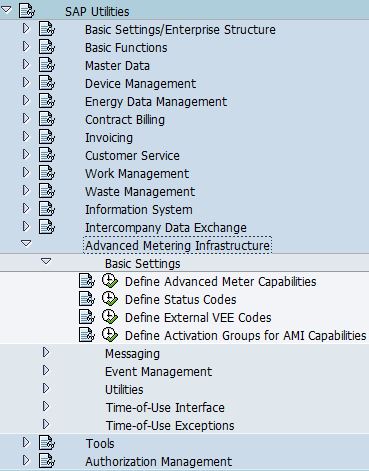
- Go to SPRO -> SAP Utilities -> Advanced Metering Infrastructure -> Basic Settings -> Define Activation Groups for AMI Capabilities

- The purpose of this configuration is to define activation group that can be used to activate or deactivate AMI capabilities of a meter independently of the capabilities of the corresponding AMS (Advanced Metering System) and AMCG (Advanced Meter Capability Group). This is an optional field on meter.
- Enter "Activation Group Name" and its description.

- Select "AMI Capabilities for Activation Group". Assign AMI capabilities to the activation group

- Note: AMS and AMCG must support the capabilities as well if you need to turn on the capabilities in activation group.


Friday, August 14, 2020
AMI: Step 7: Determination Group of Advance Meter Capability Group (AMCG DG)
- Go to SPRO -> SAP Utilities -> Advanced Metering Infrastructure -> Basic Settings -> Define Advanced Meter Capabilities

- Select "Determination Group of Advance Meter Capability Group (AMCG DG)". The purpose of this configuration is to determine advance meter capability group. It is assigned to device category, and if default AMCG is selected, it will be assigned to AMI meter during meter creation.
- Enter "Advance Meter Capability Group Determination Group Name" and its description.

- Select "Advance Meter Capability Group of a Determination Group (AMCG DG)". Assign "Advance Meter Capability Group (AMCG)" to this determination group.


Tuesday, July 14, 2020
AMI: Step 6: Capability Group of Device (AMCG)
- Go to SPRO -> SAP Utilities -> Advanced Metering Infrastructure -> Basic Settings -> Define Advanced Meter Capabilities

- The purpose of this configuration is to group functions of a device
- Select "Capability Group for Device". Enter "Advance Meter Capability Group" (AMCG) Number and its description

- Select "Capabilities of Device". Assign "Advance Meter Capabilities" to this device.


Tuesday, June 30, 2020
AMI: Step 5: Advanced Metering System of a Determination Group (AMS DG)
- Go to SPRO -> SAP Utilities -> Advanced Metering Infrastructure -> Basic Settings -> Define Advanced Meter Capabilities
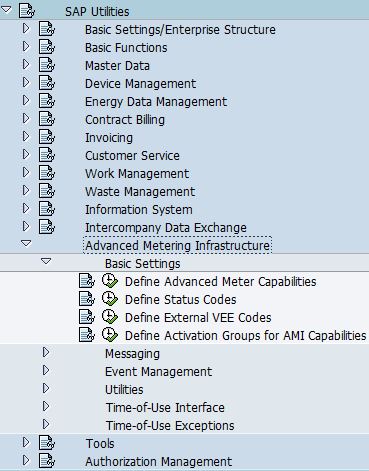
- Select "Advanced Metering System Determination Group". The purpose of this configuration is to group AMS system, this determination group is assigned to device category, if default AMS is selected, it will be assigned to AMI meter during meter creation.
- Enter "AMS Determination Group Name" and its description.

- Select "Advanced Metering System of a Determination Group". Assign AMS to "AMS Determination Group".


Sunday, June 14, 2020
AMI: Step 4: Advance Metering System (AMS)
- Go to SPRO -> SAP Utilities -> Advanced Metering Infrastructure -> Basic Settings -> Define Advanced Meter Capabilities

- Select "Advanced Metering System". The purpose of this configuration is to define system that AMI meter is connected in the advanced metering infrastructure.
- Enter AMS system name, validity date, description of the AMS system, MDUS that it is communicating to, and the capability group of AMS


Thursday, May 14, 2020
AMI: Step 3: Capability Group of Advanced Metering System (AMS CG)
- Go to SPRO -> SAP Utilities -> Advanced Metering Infrastructure -> Basic Settings -> Define Advanced Meter Capabilities

- Select Capability Group of Advanced Metering System. The purpose of this configuration is to group of functions of an advanced metering system.
- Enter "Capability Group Number" and its description

- Select "Capabilities of Advanced Metering System", after that, assign capabilities into this group.


Tuesday, April 14, 2020


Saturday, March 14, 2020
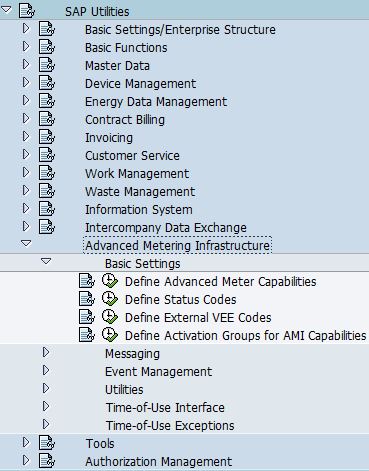
AMI: Step 1: Advanced Meter Capabilities
- Go to SPRO -> SAP Utilities -> Advanced Metering Infrastructure -> Basic Settings -> Define Advanced Meter Capabilities
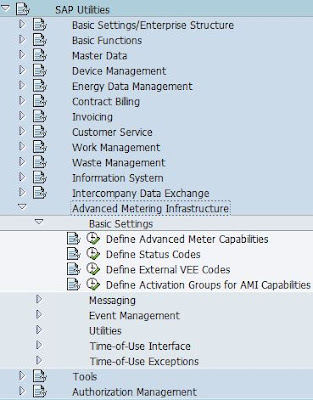
- SAP predefined the following advanced meter capabilities:
- Remote disconnection
- Remote reconnection
- Remote meter reading
- Manual meter reading using AMS
- On-demand meter reading
- Request operational state
- Receive message

- If AMS-Rel. is checked, this capability will be available when configuring Capability Group of Advanced Metering System
- If AMCG-Rel. is checked, this capability will be available when configuring Capabilities of Device
- Use 9000-9999 for custom entries

Sunday, February 23, 2020
ISU_STRUCTURE_READ (Part 2)
TABLES XT_PATH drives the sequence of FM "ISU_STRUCTURE_READ" retrieve data. The following table lists pre-defined sequence of tables supported by SAP to retrieve data from. Whenever this function module is called, the corresponding internal table listed in TABFROM field of the first record must contain the keys for data retrieval.
| TABFROM | TABTO | LINKID | Remarks |
| BCONT | EKUN | ||
| EABL | EABLG | ||
| EABL | ETDZ | ||
| EABLG | EABL | ||
| EABP | EABP | ||
| EABP | EVER | ||
| EADZ | EASTS | ||
| EADZ | ETDZ | ||
| EANL | EASTL | ||
| EANL | EASTS | ||
| EANL | ETTIF | ||
| EANL | EVBS | ||
| EANL | EVER | ||
| EANL | TE422 | ||
| EASTI | EASTI | ||
| EASTI | EASTIH | ||
| EASTI | ETDZ | ||
| EASTIH | EASTI | ||
| EASTL | EANL | ||
| EASTL | EGER | ||
| EASTS | EADZ | ||
| EASTS | EANL | ||
| EASTS | ETDZ | ||
| EAUS | EAUSV | ||
| EAUS | FKKVKP | ||
| EAUSV | EAUS | ||
| EAUSV | EVER | ||
| EEIN | EEINV | ||
| EEIN | FKKVKP | ||
| EEINV | EEIN | ||
| EEINV | EVER | ||
| EGER | EASTL | ||
| EGER | EGPL | ||
| EGER | ETDZ | ||
| EGER | EZUG | 1 | EGER-LOGIKNR = EZUG-LOGIKNR |
| EGER | EZUG | 2 | EGER-LOGIKNR = EZUG-LOGIKNR2 |
| EGER | EZUZ | ||
| EGPL | EGER | ||
| EGPL | EHAU | ||
| EGPL | EVBS | ||
| EHAU | EGPL | ||
| EHAU | EVBS | ||
| EKUN | BCONT | ||
| EKUN | FKKVKP | ||
| ETDZ | EABL | 0 | All Meter Readings with status "0" |
| ETDZ | EABL | 1 | All Meter Readings with status <> "0" |
| ETDZ | EADZ | ||
| ETDZ | EASTI | ||
| ETDZ | EASTS | ||
| ETDZ | EGER | ||
| ETDZ | EZUZ | ||
| ETINS | EVBS | ||
| ETTIF | EANL | ||
| EVBS | EANL | ||
| EVBS | EGPL | ||
| EVBS | EHAU | ||
| EVBS | ETINS | ||
| EVER | EABP | ||
| EVER | EANL | ||
| EVER | EAUSV | ||
| EVER | EEINV | ||
| EVER | FKKVKP | ||
| EZUG | EGER | 1 | EZUG-LOGIKNR = EGER-LOGIKNR |
| EZUG | EGER | 2 | EZUG-LOGIKNR2 = EGER-LOGIKNR |
| EZUZ | EGER | ||
| EZUZ | ETDZ | ||
| FKKVKP | EAUS | ||
| FKKVKP | EEIN | ||
| FKKVKP | EKUN | ||
| FKKVKP | EVER | ||
| TE420 | TE422 | ||
| TE422 | EANL | ||
| TE422 | TE420 |
Subscribe to:
Posts (Atom)