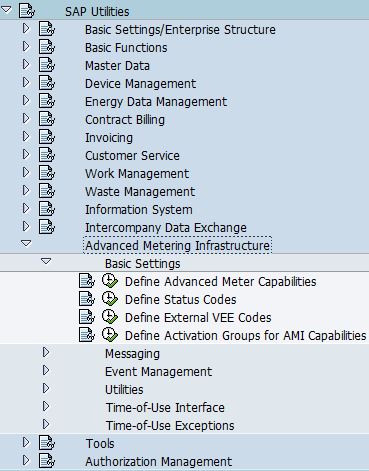
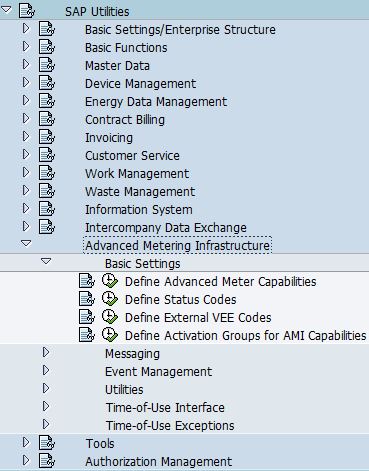
- Go to SPRO -> SAP Utilities -> Advanced Metering Infrastructure -> Basic Settings -> Define External VEE Codes

- Enter VEE Code and its description.

- VEE stands for Validation, Estimation, Editing of register read or interval data in external system.
- This is assigned at register level.
- In SAP, VEE code is for information only and is not used for meter readings validation.
- VEE codes defined here should correspond to the codes used in external system.
Sunday, May 15, 2016
AMI: Define External VEE Codes


Friday, April 15, 2016
AMI: Define Status Codes
- Go to SPRO -> SAP Utilities -> Advanced Metering Infrastructure -> Basic Settings -> Define Status Codes
- The purpose of status codes are used for operational state request.
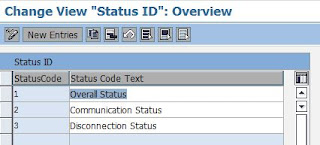
- SAP predefined the following status codes:
- Overall Status
- Communication Status
- Disconnection Status

Saturday, April 2, 2016
Billing: Variant: IF12
IF12 is used to check current billing run equals or not equals to the following scenario:
 NOTE: Check against ERCH-SIMULATION.
- Budget Billing Extrapolation
- Unbilled Revenue Reporting
- Simulation for a period
- Billing Simulation for a trigger
- Overall Check
- Call up Simulation from Billing (QUANTI26)
- Customer-Specific Simulation
 NOTE: Check against ERCH-SIMULATION.
Friday, April 1, 2016
Billing: Define Line Item Types
- Custom line item types are used when:
- Custom variant program is created and default custom line item types are required
- As a indicator for bill print to:
- Print out description for different charges
- Differentiates consumption, demand, highest peak demand in past 12 months
- Go to SPRO -> SAP Utilities -> Tools -> System Modifications -> User-Defined Enhancements for Billing -> User-Defined Variant Programs -> Define Line Item Types
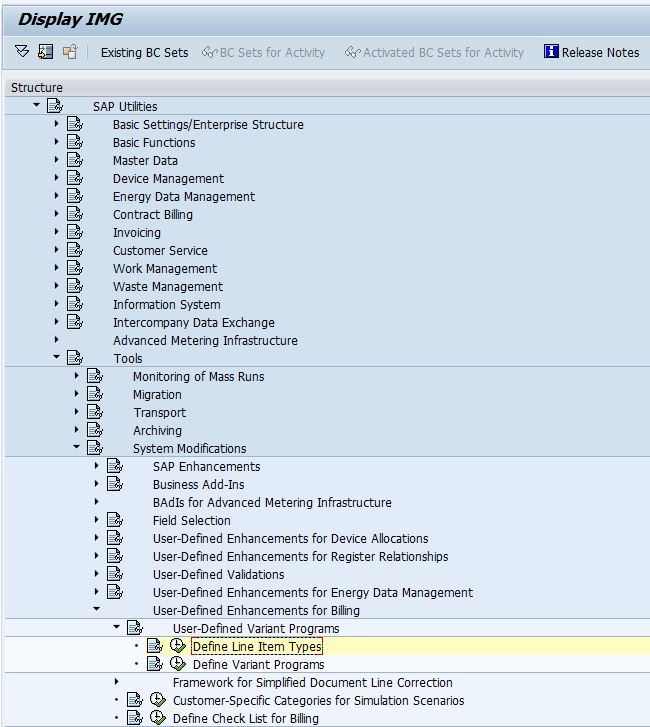
- Add entries:

- Explanation:
Field
Name
|
Usage
|
LineItmTyp
|
Line item type to be used in billing configuration
|
Text
|
Description of the line item type
|
U
|
Typically being set for internally used line item
types.
|
NA
|
Do not archive document line
|
Friday, March 11, 2016
TH_POPUP
-->
CALL FUNCTION 'TH_POPUP'
EXPORTING
client =
user =
message =
* MESSAGE_LEN = 0
* CUT_BLANKS = ' '
* EXCEPTIONS
* USER_NOT_FOUND = 1
* OTHERS = 2
.
client =
user =
message =
* MESSAGE_LEN = 0
* CUT_BLANKS = ' '
* EXCEPTIONS
* USER_NOT_FOUND = 1
* OTHERS = 2
.
*------------------------------------------
* EXPLANATION:
*------------------------------------------
1. CLIENT => Client ID
2. USER => User name
3. MESSAGE => Message to be delivered to the user
 |
| Message Sent |
 |
| Message Delivered |
Thursday, October 18, 2012

Tuesday, September 18, 2012

Subscribe to:
Posts (Atom)