- Go to SPRO -> SAP Utilities -> Advanced Metering Infrastructure -> Basic Settings -> Define Status Codes
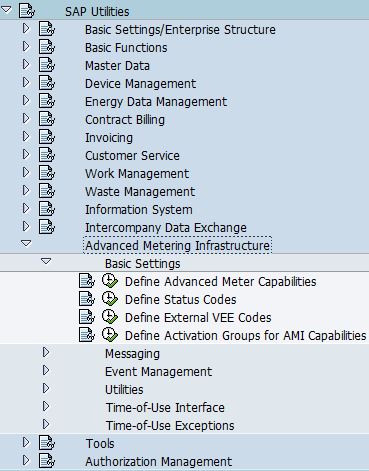
- The purpose of status codes are used for operational state request.
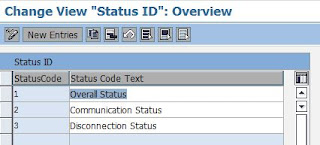
- SAP predefined the following status codes:
- Overall Status
- Communication Status
- Disconnection Status
Friday, April 15, 2016
AMI: Define Status Codes


Saturday, April 2, 2016
Billing: Variant: IF12
IF12 is used to check current billing run equals or not equals to the following scenario:
 NOTE: Check against ERCH-SIMULATION.
- Budget Billing Extrapolation
- Unbilled Revenue Reporting
- Simulation for a period
- Billing Simulation for a trigger
- Overall Check
- Call up Simulation from Billing (QUANTI26)
- Customer-Specific Simulation
 NOTE: Check against ERCH-SIMULATION.
Friday, April 1, 2016
Billing: Define Line Item Types
- Custom line item types are used when:
- Custom variant program is created and default custom line item types are required
- As a indicator for bill print to:
- Print out description for different charges
- Differentiates consumption, demand, highest peak demand in past 12 months
- Go to SPRO -> SAP Utilities -> Tools -> System Modifications -> User-Defined Enhancements for Billing -> User-Defined Variant Programs -> Define Line Item Types
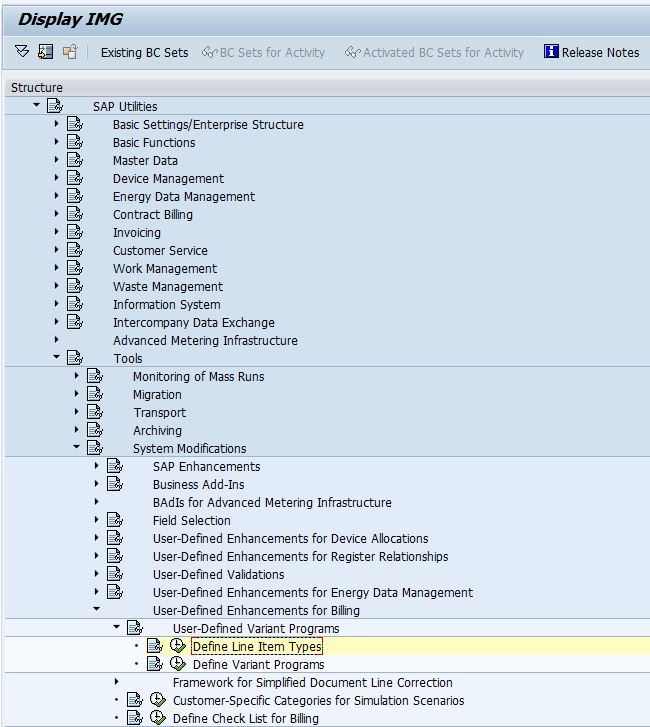
- Add entries:

- Explanation:
Field
Name
|
Usage
|
LineItmTyp
|
Line item type to be used in billing configuration
|
Text
|
Description of the line item type
|
U
|
Typically being set for internally used line item
types.
|
NA
|
Do not archive document line
|
Friday, March 11, 2016
TH_POPUP
-->
CALL FUNCTION 'TH_POPUP'
EXPORTING
client =
user =
message =
* MESSAGE_LEN = 0
* CUT_BLANKS = ' '
* EXCEPTIONS
* USER_NOT_FOUND = 1
* OTHERS = 2
.
client =
user =
message =
* MESSAGE_LEN = 0
* CUT_BLANKS = ' '
* EXCEPTIONS
* USER_NOT_FOUND = 1
* OTHERS = 2
.
*------------------------------------------
* EXPLANATION:
*------------------------------------------
1. CLIENT => Client ID
2. USER => User name
3. MESSAGE => Message to be delivered to the user
 |
| Message Sent |
 |
| Message Delivered |
Thursday, October 18, 2012

Tuesday, September 18, 2012

Friday, August 24, 2012
Event R721 Restrict Contracts during creation of disconnection / reconnection order
In one of our implementation, we create disconnect order in background by calling FM 'ISU_S_DISCDOC_CHANGE', and we have troubles in deciding which devices to be disconnected and some devices are not even exist in the itab XY_DVALOBJ (BAPI Definition ISU_SERVORD_EDCN, Method SET_ORDERCODE_DISCONNECT) for you to choose.
SAP use a unique way to find out Contracts that can be disconnected. Basically SAP will check contracts that are listed in the open overdue items against dunning activities (FKKMAKT), and then check against Dunning History (FKKMAZE), if records exist, the contract can be disconnected. Thus, sometimes when you reverse the dunning and then re-run it again, some other devices are available for you to choose again, it's kind of magic. Lol~
Anyway, this can be resolved by enhancing event R721, you can either refresh itab T_DISC_EVER, so that all contracts are taken into consideration, or, define your own logic to include more contracts to T_DISC_EVER.
Technical Information:
Program: SAPLES34
Include Program: LES34F46
Form: DCORD_DARK_PBO
Then,
FM 'ISU_DISCDOC_ENVIRONMENT_SELECT'
Then,
FM 'ISU_GET_EVER_DISC_RELEVANT'
Then,
FM 'ISU_DB_GET_POS_DISC_RELEVANT'
SAP use a unique way to find out Contracts that can be disconnected. Basically SAP will check contracts that are listed in the open overdue items against dunning activities (FKKMAKT), and then check against Dunning History (FKKMAZE), if records exist, the contract can be disconnected. Thus, sometimes when you reverse the dunning and then re-run it again, some other devices are available for you to choose again, it's kind of magic. Lol~
Anyway, this can be resolved by enhancing event R721, you can either refresh itab T_DISC_EVER, so that all contracts are taken into consideration, or, define your own logic to include more contracts to T_DISC_EVER.
Technical Information:
Program: SAPLES34
Include Program: LES34F46
Form: DCORD_DARK_PBO
Then,
FM 'ISU_DISCDOC_ENVIRONMENT_SELECT'
Then,
FM 'ISU_GET_EVER_DISC_RELEVANT'
Then,
FM 'ISU_DB_GET_POS_DISC_RELEVANT'
Subscribe to:
Posts (Atom)