FUNCTION isu_zaccbal.
*"----------------------------------------------------------------------
*"*"Local Interface:
*" IMPORTING
*" REFERENCE(X_RED) TYPE ISU2A_REDUCED_BILLING_DATA
*" REFERENCE(X_OP) TYPE ISU2A_VARIANT_PARAMETERS
*" REFERENCE(X_SS) TYPE ISU2A_SS
*" CHANGING
*" REFERENCE(XY_OBJ) TYPE ISU2A_BILLING_DATA
*" REFERENCE(XY_SOBJ) TYPE ISU2A_DATA_COLLECTOR
*" EXCEPTIONS
*" GENERAL_FAULT
*" REGULAR_ERROR
*"----------------------------------------------------------------------
*---------------------------------------------------*
* DATA
*---------------------------------------------------*
INCLUDE ievarbasic.
DATA:
ls_zone TYPE isu2a_zone,
ls_fkkvkp TYPE fkkvkp,
lv_bal TYPE bapicurr_d,
ls_acc_bal TYPE bapiaccbalances,
lt_acc_bal TYPE STANDARD TABLE OF bapiaccbalances.
*---------------------------------------------------*
* LOGIC
*---------------------------------------------------*
*---------------------------------------------------*
* Getting Account Balance
*---------------------------------------------------*
MOVE-CORRESPONDING x_ss TO werchz.
"Initialize Output Operand 1
mac_init_output co_cont2 x_op-o1.
SELECT SINGLE * INTO ls_fkkvkp FROM fkkvkp WHERE vkont EQ xy_sobj-ever-vkonto.
IF sy-subrc IS INITIAL.
CALL FUNCTION 'BAPI_ACCOUNT_GETBALANCES'
EXPORTING
contractaccount = xy_sobj-ever-vkonto
partner = ls_fkkvkp-gpart
TABLES
account_balances = lt_acc_bal.
LOOP AT lt_acc_bal INTO ls_acc_bal.
CASE ls_acc_bal-text.
WHEN 'Open'.
lv_bal = lv_bal + ls_acc_bal-withd_val.
WHEN 'Credit'.
lv_bal = lv_bal - ls_acc_bal-withd_val.
ENDCASE.
ENDLOOP.
ENDIF.
MOVE-CORRESPONDING werchz TO out_oper.
out_oper-qnt_new = lv_bal.
out_oper-qnt_old = lv_bal.
"Updating operands into table IOPER, so that operand value is accessible in other schema steps
mac_output_ioper x_op-o1.
werchz-nettobtr = lv_bal.
ls_zone-operab = werchz-ab.
ls_zone-z = werchz.
APPEND ls_zone TO izone.
"Output results to invoice, prequisites, OUT_OPER and IZONE
mac_invoice_line co_dltyp01.
ENDFUNCTION.
Saturday, March 1, 2025
Billing: Custom Variant: Example 1: Get Account Balance


Monday, September 14, 2020
AMI: Step 8: Advance Metering Infrastructure of Capability Activation Group (AMICAG)
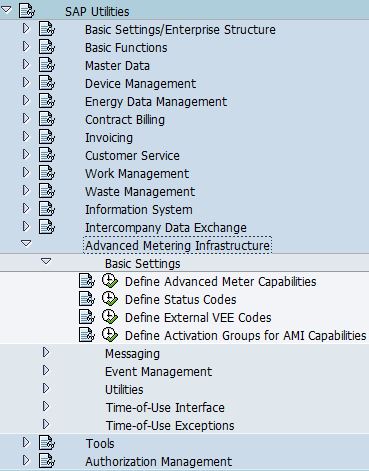
- Go to SPRO -> SAP Utilities -> Advanced Metering Infrastructure -> Basic Settings -> Define Activation Groups for AMI Capabilities

- The purpose of this configuration is to define activation group that can be used to activate or deactivate AMI capabilities of a meter independently of the capabilities of the corresponding AMS (Advanced Metering System) and AMCG (Advanced Meter Capability Group). This is an optional field on meter.
- Enter "Activation Group Name" and its description.

- Select "AMI Capabilities for Activation Group". Assign AMI capabilities to the activation group

- Note: AMS and AMCG must support the capabilities as well if you need to turn on the capabilities in activation group.


Friday, August 14, 2020
AMI: Step 7: Determination Group of Advance Meter Capability Group (AMCG DG)
- Go to SPRO -> SAP Utilities -> Advanced Metering Infrastructure -> Basic Settings -> Define Advanced Meter Capabilities

- Select "Determination Group of Advance Meter Capability Group (AMCG DG)". The purpose of this configuration is to determine advance meter capability group. It is assigned to device category, and if default AMCG is selected, it will be assigned to AMI meter during meter creation.
- Enter "Advance Meter Capability Group Determination Group Name" and its description.

- Select "Advance Meter Capability Group of a Determination Group (AMCG DG)". Assign "Advance Meter Capability Group (AMCG)" to this determination group.


Tuesday, July 14, 2020
AMI: Step 6: Capability Group of Device (AMCG)
- Go to SPRO -> SAP Utilities -> Advanced Metering Infrastructure -> Basic Settings -> Define Advanced Meter Capabilities

- The purpose of this configuration is to group functions of a device
- Select "Capability Group for Device". Enter "Advance Meter Capability Group" (AMCG) Number and its description

- Select "Capabilities of Device". Assign "Advance Meter Capabilities" to this device.


Tuesday, June 30, 2020
AMI: Step 5: Advanced Metering System of a Determination Group (AMS DG)
- Go to SPRO -> SAP Utilities -> Advanced Metering Infrastructure -> Basic Settings -> Define Advanced Meter Capabilities
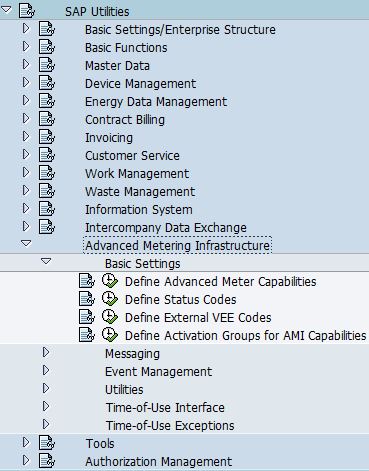
- Select "Advanced Metering System Determination Group". The purpose of this configuration is to group AMS system, this determination group is assigned to device category, if default AMS is selected, it will be assigned to AMI meter during meter creation.
- Enter "AMS Determination Group Name" and its description.

- Select "Advanced Metering System of a Determination Group". Assign AMS to "AMS Determination Group".


Sunday, June 14, 2020
AMI: Step 4: Advance Metering System (AMS)
- Go to SPRO -> SAP Utilities -> Advanced Metering Infrastructure -> Basic Settings -> Define Advanced Meter Capabilities

- Select "Advanced Metering System". The purpose of this configuration is to define system that AMI meter is connected in the advanced metering infrastructure.
- Enter AMS system name, validity date, description of the AMS system, MDUS that it is communicating to, and the capability group of AMS


Thursday, May 14, 2020
AMI: Step 3: Capability Group of Advanced Metering System (AMS CG)
- Go to SPRO -> SAP Utilities -> Advanced Metering Infrastructure -> Basic Settings -> Define Advanced Meter Capabilities

- Select Capability Group of Advanced Metering System. The purpose of this configuration is to group of functions of an advanced metering system.
- Enter "Capability Group Number" and its description

- Select "Capabilities of Advanced Metering System", after that, assign capabilities into this group.


Subscribe to:
Posts (Atom)