- Go to t-code BRFIMC03, enter the application class and then click "Delete" button.

- Click "Yes" button.

Monday, March 26, 2018
Collection Strategy: BRF: Tips 2: How to Delete Implementing Class (BRFIMC03)


Thursday, March 8, 2018
Unbilled Revenue: Step 2 - EAMS10 - Create Simulation Indexes for Mass Simulation
 |
| EAMS10 - Create Simulation Indexes for Mass Simulation |
Specify "Simulation Period ID" created in Step 1, and fill up the selection screen if needed. SAP will group all the installations fulfilled the conditions for simulation and update into table EBISIM.
Monday, February 26, 2018
Collection Strategy: BRF: Tips 1: How to Delete Application Class (BRFAPL03)
- Go to t-code BRFAPL03, enter the application class and then click "Delete" button.

- Click "Yes" button.

Thursday, February 8, 2018
Unbilled Revenue: Step 1 - EAMS20 - Create Simulation Period ID
 | ||||||||||||||||
EAMS20 - Create Simulation Period ID
|
Monday, January 8, 2018
Unbilled Revenue Summary
In short, steps to perform unbilled revenue in SAP is:
- EAMS20 - Create Simulation Period ID
- Set Simulation Run Status to "Create Mass Simulation Indexes"
- EAMS10 - Create Simulation Indexes for Mass Simulation
- SAP registers installation to be simulated into table EBISIM
- EAMS20 - Create Simulation Period ID
- Set Simulation Run Status to "Bill Mass Simulation Index"
- EAMS01 - Mass Billing of Sim Indexes
- RSA7 - BW Delta Queue Maintenance
- To view extracted data stored in data source 0UC_SALES_SIMU_01
Friday, October 6, 2017
Missing "Enterprise Service Browser" button SE80
If you launched t-code SE80 but couldn't see "Enterprise Service Browser" button like the following screenshots, what do you need to do?

Go to Utilities -> Settings

Check "Enterprise Service Browser"
 You will able to browse enterprise services now:


Go to Utilities -> Settings

Check "Enterprise Service Browser"


Thursday, August 17, 2017
Collection Strategy: BRF: Option 2: Step 5: Define Additional Settings for Application Class
- Go to SPRO -> Financial Accounting (New) -> Contract Accounts Receivable and Payable -> Business Transactions -> Dunning -> Dunning by Collection Strategy -> Settings in Business Rule Framework -> Define Additional Settings for Application
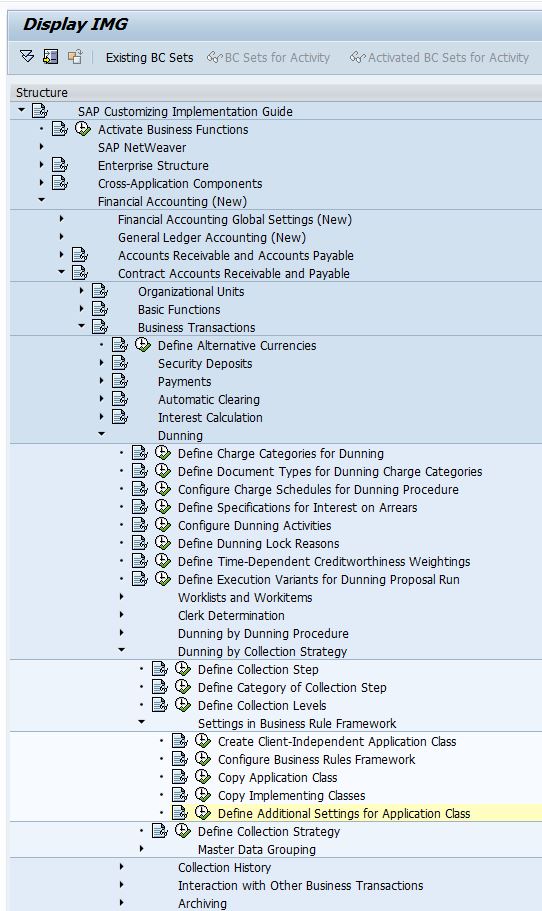
- Configure application class and choose appropriate Application, for collection strategy, this should be Collections Management.

|
Field
Name
|
Usage
|
|
Application
Class
|
Application Class that you have created for
Collection Strategy
|
|
Application
|
Application that is calling this application class:
·
TOBJ - Object-Based Tax Calculation and
Validation
·
TFOR - Form-Based Tax Calculation and
Validation
·
COLL - Collections Management
·
PTAX
·
0001
·
REF1 - Refund Process
·
REG1 - Registration Process
|
|
Time-Dependent
|
Whether the BRF objects are time-dependent
|
|
NoEndTime
|
Excluding End Time, for example, the validity date is from 2/1/2013 to 2/1/2015, if this is
selected, 2/1/2015 will be excluded.
|
|
Time Unit
|
Day or Hour
|
Subscribe to:
Posts (Atom)