
Tuesday, August 24, 2010


Monday, July 19, 2010
System Debugging
System Debuggin is used to debug a system program. Debugger will skip this program if System Debugging is not turned on even though you had set the session breakpoint.
How to check the program is system program or not? Go to -> Attribute, Look for Program Status field, "S" represent System Program.
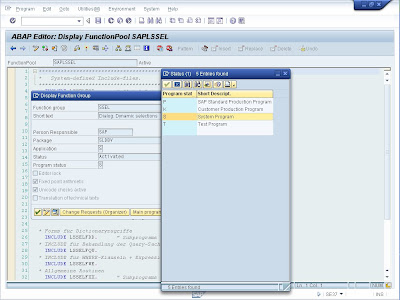
How to turn on System Debugging?
How to check the program is system program or not? Go to -> Attribute, Look for Program Status field, "S" represent System Program.

How to turn on System Debugging?
- Enter "/hs" instead of "/h" in Command Field.
- Go to System -> Utilities -> Debug System.
- In debugging session, before reaching the system program, go to Setting -> Display/Change Debugger Settings, and change the debugger setting
- In debugging session, before reaching the system program, go to Setting -> System Debugging On/Off.


Friday, June 25, 2010
Application Form: Create Link to other clients

During Unit Testing/ System Integration Testing period, it is advisable to create application form link in other clients instead of creating application for each and every client. Thus, changes in development client are reflected in other clients. (Please take note this is simple a link, no objects are copied).

You can specify the target client and existing active application form that you want to create link to.
Tuesday, June 22, 2010
FREE_SELECTIONS_EX_2_WHERE
This FM helps to construct WHERE conditions of a select statement. This is useful if you have the requirement to implement a dynamic select statement.
How to implement it?
You have to initiate Type Group RSDS by using TYPE-POOL keyword. After that, you need a internal table and structure of type RSDS_EXPR. This will store the expression of the selection:
RSDS_EXPR-TABLENAME -> Table Name
RSDS_EXPR-EXPR_TAB-> Itab stores the expressions
- RSDS_EXPR-EXPR_TAB-LOGOP -> Logical Operation ("AND", "OR", "NOT", only)
- RSDS_EXPR-EXPR_TAB-ARITY -> Priority of Logical Operation
- RSDS_EXPR-EXPR_TAB-FIELDNAME -> Table's field name for selection
- RSDS_EXPR-EXPR_TAB-OPTION -> Selection Option ("EQ", "BT", "CP", "GT", and etc.)
- RSDS_EXPR-EXPR_TAB-LOW -> Value - Low
- RSDS_EXPR-EXPR_TAB-HIGH -> Value - High
WHERE hvorg EQ '0600'
AND ( tvorg EQ '0010'
OR tvorg EQ '0011' )
AND augst EQ ''
AND augrd NE '05'.
RSDS_EXPR-EXPR_TAB shall be populated in this manner:

The result would be:

Monday, June 21, 2010
How to debug Background Job (Part 3)
1. During implement your code, Call FM 'C160_HOLD_FOR_DEBUG'.
2. Go to System -> User Profile -> Own Data or T-Code SU03.
+1.jpg)
3. Add a User Master Parameter ID, 'ESN' and flag it with 'X'. Data stored in Table USR05.
+2.jpg)
4. This FM will run a infinite loop now and you can debug via SM50.
2. Go to System -> User Profile -> Own Data or T-Code SU03.
+1.jpg)
3. Add a User Master Parameter ID, 'ESN' and flag it with 'X'. Data stored in Table USR05.
+2.jpg)
4. This FM will run a infinite loop now and you can debug via SM50.
Thursday, June 17, 2010
How to debug Background Job (Part 2)
1. Write an infinite loop in your code.
+1.jpg)
DATA: lv_infinite TYPE i.2. Then go to SM50, select the program and then go to:
WHILE lv_infinite EQ 0.
ENDWHILE.
Program/Session -> Program ->Debugging
+1.jpg)
Subscribe to:
Posts (Atom)