- Go to SPRO -> Financial Accounting (New) -> Contract Accounts Receivable and Payable -> Business Transactions -> Dunning -> Dunning by Collection Strategy -> Settings in Business Rule Framework -> Configure Business Rules Framework

- Click on "Wizard" button.

- Start: Click "Continue" button.

- Define Application Class (Cross-Client): Enter Application Class Name and Description, After that click "Continue" button.

- Define Cross-Client Settings:
- Trace Class: CL_TRACE_BRF
- Impl. Tree Class: CL_WB_TREE_DEFAULT_BRF
- General Services: CL_FKK_BRF_APPLCLASS_SERVICES. After that, click "Continue" button.

- Select Object Types (Implementing Classes): Click "Continue" button.

- Edit Short Texts of Object Types: Click "Continue" button.

- Define the First Context: Click "Continue" button. (We don't want to create Context over here because Dunning is getting Context differently)

- Define the First BRF Event: Click "Continue" button. (We don't want to create Event over here because Dunning is using different Implementing Class)

- Complete: Click "Complete" button.

Sunday, March 26, 2017
Collection Strategy: BRF: Option 2: Step 1: Configure Business Rules Framework (BRF)


Sunday, February 26, 2017
Collection Strategy: BRF: Option 1: Step 1: Create Client-Independent Application Class
- Go to SPRO-> Financial Accounting (New) -> Contract Accounts Receivable and Payable -> Business Transactions -> Dunning -> Dunning by Collection Strategy -> Settings in Business Rule Framework -> Create Client-Independent Application Class.

- Enter Application Class Name

- Enter Application Class Description and then click "Save" button.

Wednesday, October 5, 2016
Billing: Define Checks per Outsorting Check Group for Billing
- Go to SPRO -> SAP Utilities -> Contract Billing -> Billing Execution -> Outsorting for Billing -> Define Checks per Outsorting Check Group for Billing

- Enter configuration details:

- Explanation:
Field NameUsageOutsort. Chk grpName of the Outsorting Check GroupBilling Trans.01 Periodic Billing (01)02 Interim Billing (02)03 Final Billing for Move-Out (03)04 Period-End Billing (04)05 Service Territory Transfer (05)06 Manual Credit Memo/Backbilling (06)07 Contract Change (07)08 Customer change (08)Consecutive no.Consecutive number of checking per billing transactionMass SimulationNo Restrictions1 Do Not Carry Out Check in Mass Simulation2 Only Carry Out Check in Mass SimulationBill. ValidationRefer to Value Table TE007Parameters 1 to 4Parameters for outsorting validation, these parameters behave differently per validation, typically used as range of amount to be validatedParameter 5Parameter for outsorting validation, this parameter accepts characters inputTextDescription of the outsorting check group defined. - This outsort check group can then be assigned to contract.


Friday, September 2, 2016


Friday, August 12, 2016
Invoicing: Define Manual Bill Outsorting for Invoicing
- SPRO -> SAP Utilities -> Invoicing -> Invoice Processing -> Outsorting for Invoicing -> Define Manual Bill Outsorting for Invoicing

- Enter the reason for manual bill outsorting for invoicing, description, number of manual outsorting, outsorting for invoice or bill printing.

- Explanation: Field NameUsageMan. OS invReason for Manual Outsorting InvoiceTextDescription of the manual outsorting invoiceNo. man.OSNumber of manual outsort, this will be the default number of outsortings upon entering the reason for manual outsorting invoice. The number of outsortings will be reduced whenever the contract account gets invoiced.OutSrt. Invoic.Indicates that this is an outsorting for InvoicingOutSrt. Print.Indicates that this is an outsorting for Bill Printing


Sunday, May 15, 2016
AMI: Define External VEE Codes
- Go to SPRO -> SAP Utilities -> Advanced Metering Infrastructure -> Basic Settings -> Define External VEE Codes

- Enter VEE Code and its description.

- VEE stands for Validation, Estimation, Editing of register read or interval data in external system.
- This is assigned at register level.
- In SAP, VEE code is for information only and is not used for meter readings validation.
- VEE codes defined here should correspond to the codes used in external system.


Friday, April 15, 2016
AMI: Define Status Codes
- Go to SPRO -> SAP Utilities -> Advanced Metering Infrastructure -> Basic Settings -> Define Status Codes
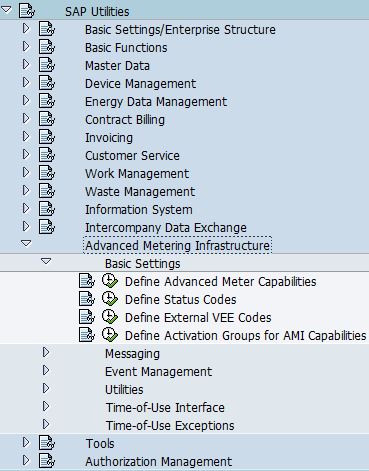
- The purpose of status codes are used for operational state request.
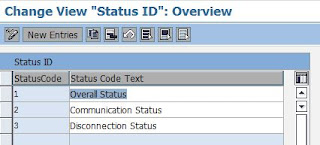
- SAP predefined the following status codes:
- Overall Status
- Communication Status
- Disconnection Status


Subscribe to:
Posts (Atom)